
Accurate tip tracking means keeping a daily, contemporaneous record of every dollar you receive in tips and reporting them to your employer and the IRS as required by law. The IRS mandates that servers and bartenders report tips monthly of $20 or more per employer by the 10th of the following month. From 2025 through 2028, qualifying tipped workers can deduct up to $25,000 in reported tips from their federal taxable income under the "No Tax on Tips" provision. Knowing how to track tips for taxes as a server is not just about compliance. It protects your Social Security benefits, shields you from IRS audits, and puts more money back in your pocket.
How to track tips for taxes as a server: daily log methods
The most reliable tip tracking method is a daily log that records every shift the moment it ends. The IRS requires contemporaneous daily records, meaning you document tips the same day you earn them, not at the end of the week from memory. Waiting even 24 hours introduces errors that compound over a year.
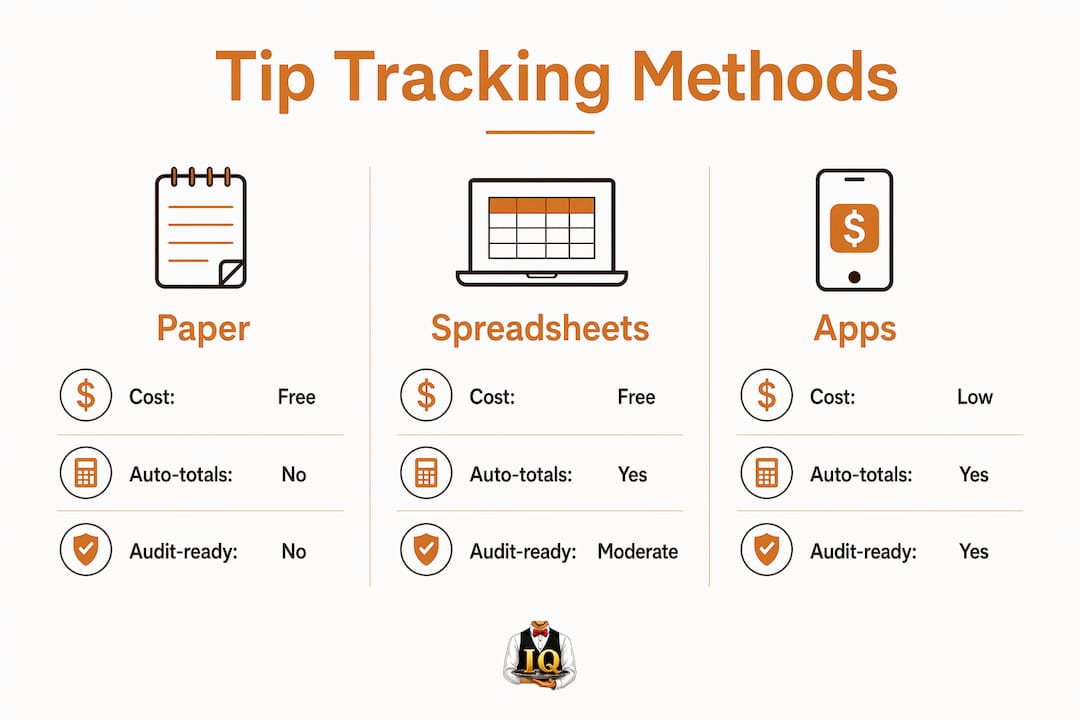
Paper notebooks
A small notebook kept in your apron or locker works well for servers who prefer a physical record. Write the date, your cash tips, your credit card tips, any tip-outs you received, and the net amount you kept after sharing. The IRS accepts handwritten logs as valid evidence during an audit, provided entries are consistent and dated.
Spreadsheets
A spreadsheet on Google Sheets or Microsoft Excel gives you automatic totals and is easy to back up to the cloud. Build columns for date, shift type, cash tips, card tips, tip-outs paid, tip-outs received, and net tips kept. The running monthly total makes employer reporting straightforward.

Specialized tip tracking apps
Purpose-built apps for servers record all the same fields but add speed and convenience. Serveriq, for example, lets you log shifts and update earnings through voice commands with its virtual assistant, Chip. At $3 per month, it generates detailed reports that align directly with what you need for monthly employer reporting and year-end tax filing. You can read a full breakdown of top tracking options for servers and bartenders.
The table below compares the three main approaches across the factors that matter most for IRS compliance.
| Method | Cost | Auto-totals | Audit-ready | Best for |
|---|---|---|---|---|
| Paper notebook | Free | No | Yes, if consistent | Servers who prefer analog |
| Spreadsheet | Free | Yes | Yes | Servers comfortable with tech |
| Tip tracking app | Low monthly fee | Yes | Yes | Servers wanting speed and reports |
Pro Tip: Make tip logging part of your clock-out routine. Log your tips before you leave the building, every single shift. Consistency matters more than the tool you choose, and daily habit-building is what keeps your records IRS-ready.
How does a server report tips monthly to their employer?
The IRS requires you to report tips to your employer when your total tips from a single employer reach $20 or more in a calendar month. That threshold applies per employer, so if you work two jobs, you track each separately. Here is the exact process to follow.
- Total your tips for the month. Add cash tips, credit card tips, and any tip-outs you received. Subtract tip-outs you paid to other staff, since you only report what you actually kept.
- Use Form 4070 or your employer's system. IRS Form 4070 is the standard written report for employees. Many restaurants use their own point-of-sale system or payroll software instead. Either method satisfies the IRS requirement.
- Submit by the 10th of the following month. Tips earned in january, for example, must be reported to your employer by february 10. Missing this deadline puts you at risk of penalties.
- Keep a copy of every report you submit. Your copy becomes part of your personal records and supports your year-end reconciliation.
Failing to report on time does not make the income disappear. Your employer may allocate tips to you based on a percentage of sales, and allocated tips appear in Box 8 of your W-2. Without your own log, you have no legal basis to dispute that number.
Pro Tip: If your employer uses a digital reporting system, screenshot or save each submission. Paper trails protect you if payroll records ever get disputed.
What steps should servers follow for year-end tax reconciliation?
Year-end reconciliation is the process of comparing your personal tip log totals against what your employer reported on your W-2. Skipping this step is one of the most common and costly mistakes servers make.
- Check Box 1, Box 5, and Box 7 on your W-2. Box 7 shows the tips your employer received from your monthly reports. Box 1 includes all wages and tips. Box 5 shows wages subject to Medicare tax. All three should align with your personal records.
- Identify any discrepancies. If your log shows you earned less than what appears in Box 8 as allocated tips, your contemporaneous records are your legal defense. Personal logs proving lower tips allow you to report the lower, accurate amount.
- File Form 4137 for unreported tips. If you failed to report some tips to your employer during the year, use IRS Form 4137 with your tax return. This form calculates the Social Security and Medicare taxes owed on those amounts.
- Understand the Social Security impact. Unreported tips reduce your future Social Security and Medicare benefits because those taxes were never paid. Accurate reporting protects your long-term financial security, not just your current tax bill.
- Reconcile monthly, not just annually. Comparing your log to your pay stub each month catches errors while they are still easy to fix. Monthly reconciliation prevents end-of-year surprises and keeps you compliant throughout the year.
Pro Tip: Keep your tip logs for at least three years after filing. The IRS audit window is generally three years, and your records are your strongest defense if questions arise.
The table below shows which IRS forms apply at each stage of the reporting process.
| Stage | IRS form | Purpose |
|---|---|---|
| Monthly employer report | Form 4070 | Report tips to your employer |
| Year-end tax filing | W-2 (Boxes 1, 5, 7) | Verify employer-reported tip income |
| Unreported tips at filing | Form 4137 | Pay Social Security and Medicare taxes owed |
What are common tip tracking mistakes and how do you avoid them?
Most tip reporting errors come from habits formed early in a server's career, not from deliberate choices. Recognizing the patterns makes them easy to fix.
- Delaying your log entry. Reconstructing a week's tips from memory produces inaccurate totals. Log every shift the same day, every time.
- Forgetting tip-outs and shared tips. Tip-outs you receive from bartenders or food runners count as your income. Tip-outs you pay to others reduce your reportable amount. Both sides of the transaction belong in your log.
- Assuming small amounts don't count. The $20 monthly threshold applies to employer reporting, not to your annual tax return. Every dollar of tip income is taxable and must appear on your federal return, even if you never triggered the monthly reporting requirement.
- Ignoring non-cash tips. If a guest gives you event tickets, a gift card, or any item of value as a tip, the fair market value of that item is taxable income. Document it the same day with a note on what you received and its approximate value.
- Skipping the W-2 comparison. Large restaurants compare reported tips to 8% of gross receipts. A major gap between what you reported and that benchmark can trigger an IRS audit. Your daily log is the evidence that resolves it in your favor.
Accurate, consistent tip records are not just a tax requirement. They are the financial foundation that proves your income for loans, leases, and long-term benefits like Social Security. A five-minute habit at the end of every shift is worth far more than hours of stress during tax season.
Pro Tip: Use a server income guide to understand exactly what you keep after tip-outs and taxes. Knowing your real take-home number makes your log entries more meaningful and motivating.
Key Takeaways
Servers who maintain a daily tip log, report monthly to their employer using Form 4070, and reconcile their records with their W-2 at year-end stay IRS-compliant and protect their Social Security benefits.
| Point | Details |
|---|---|
| Daily logging is mandatory | The IRS requires contemporaneous records; log tips the same day you earn them. |
| Monthly reporting threshold | Report tips of $20 or more per employer by the 10th of the following month. |
| Form 4137 covers gaps | Use Form 4137 at tax time to report any tips you did not report to your employer during the year. |
| "No Tax on Tips" deduction | Qualifying workers can deduct up to $25,000 in tips from federal taxable income through 2028. |
| Records protect you in audits | A consistent daily log is your strongest defense if the IRS questions your reported tip income. |
Why I think most servers underestimate their tip records
The servers I have seen struggle most at tax time are not the ones who earned the least. They are the ones who treated tip tracking as optional. A daily log feels like extra work at 11:00 PM after a double shift. But the cost of skipping it shows up months later, when your W-2 allocations do not match reality and you have no records to dispute them.
The "No Tax on Tips" deduction changes the math significantly for 2026. A deduction of up to $25,000 is real money, but you can only claim it on tips you actually reported. Servers who never built a tracking habit are leaving that deduction on the table. The deduction reduces taxable income but does not make tips tax-free, so understanding the distinction matters when you file.
My honest observation is that the tool matters far less than the habit. A notebook beats an app you never open. Serveriq beats a notebook you lose. Pick the method that fits your shift routine and commit to it every single night. The servers who do this sleep better in april.
— sadler
Serveriq makes tip tracking and reporting straightforward
Keeping up with daily logs, monthly employer reports, and year-end reconciliation is a lot to manage on top of a full schedule of shifts. Serveriq was built specifically for servers and bartenders who need a fast, reliable way to stay on top of their tip income without adding stress to their workday.
For $3 per month, Serveriq tracks your tips, hourly wages, and all forms of pay in one place. The virtual assistant Chip lets you log a shift with a voice command the moment you clock out. Detailed reports give you exactly what you need for monthly employer reporting and year-end tax filing. Visit the Serveriq subscription page to see how it fits into your routine and start building the records that protect your income.
FAQ
What tips does the IRS require servers to report?
The IRS requires servers to report all tip income, including cash tips, credit card tips, and tip-outs received. All tips are taxable regardless of amount, even if they fall below the $20 monthly employer-reporting threshold.
What is the deadline to report tips to my employer?
Tips of $20 or more earned in a given month must be reported to your employer by the 10th day of the following month. Use IRS Form 4070 or your employer's reporting system to submit on time.
What happens if I forget to report some tips during the year?
File IRS Form 4137 with your annual tax return to report unreported tips and pay the correct Social Security and Medicare taxes. Failing to do so reduces future Social Security benefits and may result in IRS penalties.
Can I report less than what my employer allocated on my W-2?
Yes. If your personal daily log shows you received less than the employer's allocated amount in Box 8 of your W-2, you can report the lower figure. Without a contemporaneous log, you have no legal basis to dispute the allocation.
What is the "No Tax on Tips" deduction for 2026?
Qualifying tipped workers can deduct up to $25,000 in reported tips from their federal taxable income from 2025 through 2028. The deduction applies only to federal income tax and requires that tips be voluntary and received in cash or electronic payments.