
Multi-tenant server monitoring in restaurant environments is defined as the practice of tracking the performance, earnings, and shift data of multiple servers or bartenders across different branches, shifts, or teams from a single shared platform. Restaurant managers and their IT teams face a real challenge: one location's data should never bleed into another's, and one busy shift should never slow down reporting for the rest of the team. This multi-tenant server monitoring guide covers the architectures, tools, resource controls, and troubleshooting steps that keep every tenant's data clean, accurate, and accessible. Serveriq is built specifically for this environment, giving food service teams a structured way to manage income tracking across multiple staff groups without the confusion of mixed data.
What are the key multi-tenant architectures for restaurant server environments?
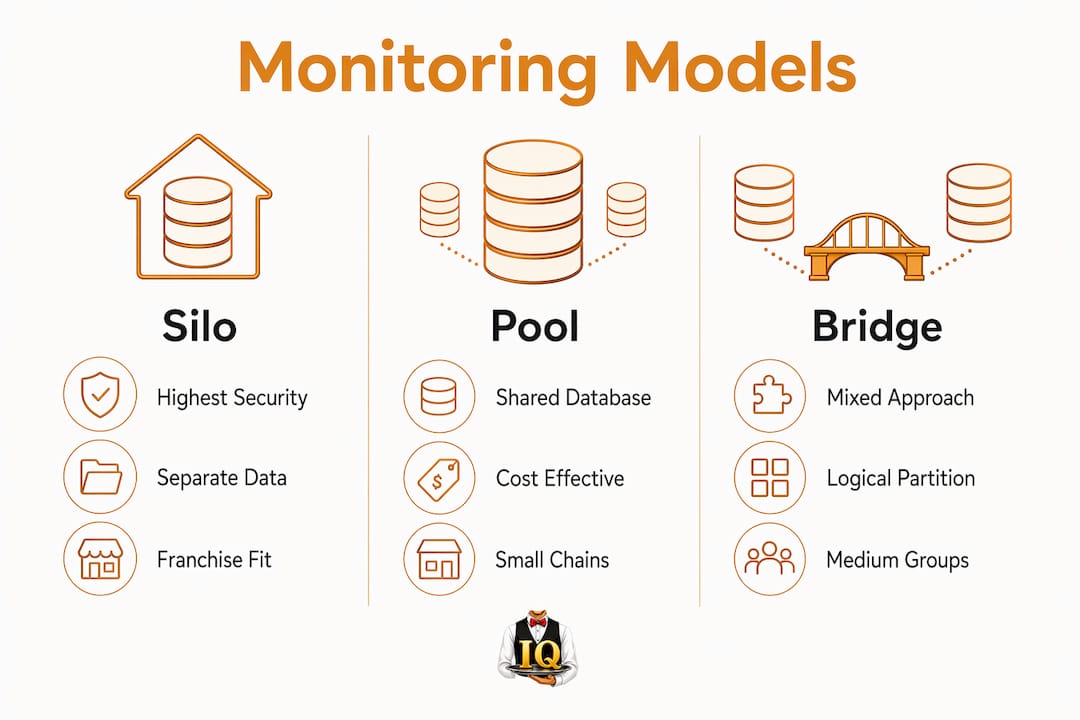
Three core models define how restaurant server monitoring systems separate tenant data: Silo, Pool, and Bridge. Each model makes a different tradeoff between security, cost, and operational complexity. Choosing the right one depends on your restaurant's size, compliance needs, and how many distinct groups you need to track.
Silo model
The Silo model gives each tenant its own completely separate data store and monitoring pipeline. In a restaurant context, this means each branch location or franchise unit gets its own earnings database, its own alert rules, and its own dashboard. Tiered isolation levels show that Silo offers the highest security for compliance but the lowest efficiency. This model fits multi-location restaurant groups that operate under different ownership structures or that must meet strict data privacy rules.

Pool model
The Pool model stores all tenant data in a shared database, separated only by tenant identifiers like a location code or team ID. This approach costs less to run and scales well as you add new restaurant locations. The tradeoff is that a misconfigured query can expose one location's tip data to another. Pool works best for single-owner restaurant groups where all locations share the same compliance requirements.
Bridge model
The Bridge model sits between Silo and Pool. It uses shared infrastructure for most operations but applies logical partitions at the data layer. For restaurant server monitoring, this often means shared dashboards with row-level access controls that filter data by tenant ID. Genuine multi-tenancy differs from shared hosting by enforcing operational locks at every boundary. Without those locks, servers merely share a space without true isolation.
Pro Tip: Define your tenant unit before you pick a model. In restaurant monitoring, a "tenant" might be a single location, a shift team, or an individual server. Getting that definition wrong early creates messy data migrations later.
| Model | Security level | Best fit |
|---|---|---|
| Silo | Highest | Multi-owner franchise groups |
| Pool | Moderate | Single-owner restaurant chains |
| Bridge | Balanced | Mid-size groups with mixed needs |
Which monitoring tools best support restaurant multi-tenant management?
The right monitoring tool for a restaurant multi-tenant setup depends on how many distinct tenant groups you need to track. Label-based monitoring suits setups with fewer than five tenants, while Mimir-style isolation with tenant headers handles five to over 100 tenants with storage-level separation. That distinction matters because label-based systems are cheaper and simpler, but they break down when tenant counts grow or when cardinality from too many unique labels causes performance problems.
For restaurant environments, the practical translation looks like this:
- Label-based tracking works for a small restaurant group where each location gets a tag in a shared earnings report. Simple, low cost, and easy to configure.
- Header-based isolation works for larger chains or franchise networks where each location needs its own ingestion pipeline, its own retention period, and its own alert thresholds.
- Dashboard integration through tools like Grafana gives managers a visual layer on top of raw data, with per-tenant views filtered by location code or team ID.
Dedicated monitoring infrastructure separate from application servers prevents monitoring outages caused by app crashes or resource saturation. This means your earnings tracking and alert system stays online even when the primary restaurant management software goes down. Running monitoring on its own server or cloud instance is not optional for production restaurant environments. It is the baseline for reliable alerting.
Pro Tip: Always run your monitoring stack on infrastructure that your restaurant management app cannot touch. If the app crashes during a Friday dinner rush, you still need your earnings alerts to fire.
Check the affordable server management tools list for a curated overview of platforms that fit restaurant-scale monitoring budgets.
How to implement resource limits and prevent noisy neighbor effects?
The noisy neighbor problem in restaurant server monitoring happens when one tenant's data volume or query load slows down reporting for everyone else. A restaurant running a large catering event might push thousands of tip entries in a short window, spiking ingestion rates and delaying dashboard refreshes for other locations. Per-tenant resource limits prevent one tenant from degrading overall performance, and they are the defining control in any well-run multi-tenant setup.
Setting those limits requires four concrete steps:
- Define per-tenant ingestion caps. Set a maximum number of data points each location can push per minute. This prevents a single busy shift from flooding the shared pipeline.
- Apply memory and CPU quotas. Use runtime configuration files or Kubernetes namespaces to assign compute budgets per tenant. Mimir runtime configs support per-tenant overrides for ingestion rate and maximum series per user.
- Set query time limits. Long-running dashboard queries from one location should not block other tenants. Apply per-tenant query timeouts at the proxy layer.
- Monitor the monitors. Set alerts that fire when any tenant approaches its ingestion or query limit. Catching a spike early is far cheaper than diagnosing a full outage after the fact.
Peak hours and special events are the two scenarios where noisy neighbor effects hit hardest. A Valentine's Day dinner service at a flagship location can generate ten times the normal tip entry volume. Pre-scaling tenant limits before known high-volume events is a standard practice in restaurant multi-tenant management.
What are best practices for onboarding new tenants to restaurant monitoring?
Onboarding a new restaurant location or shift team to a shared monitoring platform requires a checklist approach. Tenant onboarding best practices include assigning tenant IDs, applying per-tenant limits, creating secure access credentials, configuring data streams with tenant headers, and verifying data ingestion and alerts. Skipping any of those steps creates gaps that are hard to trace once the location goes live.
The most common onboarding mistakes in restaurant environments fall into three categories:
- Inconsistent tenant labeling. Using "NYC-01" for one location and "new_york_1" for another breaks dashboard filters and alert rules. Establish a naming convention before onboarding the first tenant and enforce it for every new addition.
- Missing access controls. A shift manager at one location should not be able to view tip data from another. Configure role-based access at the tenant level, not just at the platform level.
- Skipping ingestion verification. After configuring a new tenant, confirm that data is flowing correctly before declaring the onboarding complete. Migrating to multi-tenant monitoring requires monitoring ingestion to catch errors early.
Legacy data migration adds another layer of complexity. If a restaurant location tracked earnings in a spreadsheet before joining the shared platform, that historical data needs to be imported with the correct tenant ID attached to every record. Importing without tenant tags makes historical reporting unreliable and creates cross-tenant confusion in shared dashboards.
Review the server management workflow guide for a step-by-step process that restaurant staff can follow during the transition period.
How to troubleshoot common issues in multi-tenant restaurant server monitoring?
Most problems in multi-tenant restaurant monitoring fall into four categories: ingestion rate breaches, cross-tenant data leaks, missing dashboard data, and alert failures. Systematic issue diagnosis is the only reliable way to maintain stable multi-tenant monitoring across a restaurant group.
Work through issues in this order:
- Check tenant headers first. Missing or malformed tenant headers are the most common cause of data appearing in the wrong location's dashboard. Verify that every data source sends the correct tenant ID with each request.
- Review ingestion rate limits. If a location's dashboard shows gaps during peak hours, the tenant likely hit its ingestion cap. Raise the limit temporarily and investigate the root cause.
- Audit access control rules. Cross-tenant data visibility leaks almost always trace back to a misconfigured access rule. Infrastructure-level enforcement like proxy header routing is far more secure than filtering tenant data in application logic alone.
- Test alert routing. Alert failures during server outages often happen because the alert rule references a tenant ID that no longer matches the data stream. Recheck tenant ID consistency after any configuration change.
"Noisy neighbor issues manifest as ingestion rate limit errors, missing dashboard data, cross-tenant query failures, and alert misfires. Troubleshooting involves checking tenant headers, limits, and federation settings in a systematic sequence rather than guessing at the cause."
Key Takeaways
Effective restaurant multi-tenant server monitoring requires infrastructure-level tenant isolation, per-tenant resource limits, and a consistent onboarding checklist applied to every new location or team.
| Point | Details |
|---|---|
| Choose the right model | Match Silo, Pool, or Bridge to your restaurant group's size and compliance needs. |
| Separate your monitoring stack | Run monitoring infrastructure independently so app crashes do not kill your alerts. |
| Set per-tenant resource limits | Cap ingestion rates and query loads before peak events to prevent noisy neighbor slowdowns. |
| Enforce consistent tenant labeling | Use a fixed naming convention for location codes and team IDs from day one. |
| Verify ingestion after onboarding | Confirm data flows correctly for every new tenant before declaring the setup complete. |
Why infrastructure-level isolation beats application filtering every time
Most restaurant IT teams I have worked with start by filtering tenant data inside the application layer. It feels faster and cheaper at first. The problem shows up three months later when a misconfigured query exposes one location's tip totals to a manager at a different branch. That is not a hypothetical. It happens regularly in shared platforms that rely on app logic alone to separate tenant data.
Infrastructure-level tenant isolation is the only approach that holds up under real operational pressure. Proxy header routing, row-level security, and dedicated ingestion pipelines enforce boundaries that no application bug can accidentally bypass. The upfront configuration cost is higher, but the long-term reliability is not comparable.
My other strong opinion: do not wait until you have ten locations to invest in dedicated monitoring infrastructure. Even a two-location restaurant group benefits from running its monitoring stack on a separate server. The day your primary platform goes down during a Saturday night service is the day you will wish your earnings alerts were not hosted on the same machine.
Serveriq is designed with this principle built in. The platform tracks tips, wages, and shift data per server or team without mixing records across locations. That separation is not just a feature. It is the foundation that makes the reporting trustworthy.
— sadler
Serveriq makes multi-tenant restaurant monitoring straightforward
Restaurant groups managing multiple locations or shift teams need a monitoring platform built for their specific environment, not a generic tool adapted from IT infrastructure management.
Serveriq tracks tips, hourly wages, and shift earnings for individual servers and bartenders at $3 per month per user. The virtual assistant Chip logs shifts and updates earnings through voice commands, reducing manual entry errors that corrupt multi-tenant reports. Detailed earnings reports give managers and staff a clear view of income patterns by location, shift, or team without any cross-tenant data mixing. For restaurant groups ready to bring their server monitoring under one reliable platform, start your subscription and get every location reporting cleanly from day one.
FAQ
What is multi-tenant server monitoring in a restaurant context?
Multi-tenant server monitoring in restaurants is the practice of tracking earnings, tips, and shift data for multiple servers, teams, or locations from a single shared platform while keeping each group's data fully separate.
How do I choose between Silo, Pool, and Bridge models?
Choose Silo for franchise groups with strict data privacy requirements, Pool for single-owner chains where all locations share the same rules, and Bridge when you need a balance of cost and isolation.
What causes the noisy neighbor problem in restaurant monitoring?
One location pushing unusually high data volumes during a peak event can slow reporting for all other tenants. Setting per-tenant ingestion rate limits prevents this before it affects the rest of the group.
How do I onboard a new restaurant location to a shared monitoring platform?
Assign a unique tenant ID, apply per-tenant limits, configure data streams with the correct tenant headers, set up role-based access controls, and verify that data is ingesting correctly before going live.
Why should monitoring infrastructure run separately from the main restaurant platform?
Running monitoring on dedicated infrastructure means your earnings alerts and dashboards stay online even when the primary restaurant management system crashes or runs out of resources.