
An affordable server management workflow is a set of low-cost, easy-to-follow procedures that help restaurant and bar staff track tips, log shifts, and manage income without complicated tools or expensive software. For servers and bartenders living on variable pay, a clear workflow is not a luxury. It is the difference between knowing exactly what you earned and guessing at the end of every week. Serveriq makes this process accessible for under $3 per month, giving hospitality workers real income transparency without a steep learning curve or a big budget.
What tools support an affordable server management workflow?
The right tools define how well your workflow runs. For restaurant and bar staff, the best options fall into three categories: free mobile apps, low-cost subscription trackers, and basic desktop tools. Each serves a different need, and picking the wrong one wastes both time and money.
Automation and workflow standardization free staff from repetitive manual tasks, which directly cuts down on errors and increases income transparency. That matters when your pay changes every shift based on tips, table count, and hours worked.

| Tool type | Typical cost | Best for |
|---|---|---|
| Free mobile apps | $0 | Basic shift logging, no reporting |
| Low-cost subscription trackers | $3–$10/month | Tip tracking, income reports, voice input |
| Desktop management tools | One-time fee | Multi-shift overviews, no recurring cost |
| Managed payroll platforms | $275+/month | Full-service payroll, suited for managers |
Server management solutions vary from free tools to one-time payment desktop apps and subscription services starting around $275 per month for managed options. That range means most servers can find a fit at any budget level.
Managed dashboards with guardrails reduce errors for non-technical users by restricting low-level controls that cause costly mistakes. For servers who are not accountants, this kind of built-in protection is worth more than a feature list.
Pro Tip: Pick a tool that requires zero setup beyond creating an account. If you need a tutorial just to log your first shift, the tool is already costing you time.
The most cost-effective choice for individual servers is a low-cost subscription tracker like Serveriq. At $3 per month, it covers tip tracking, hourly wages, and multiple pay types, and its virtual assistant Chip lets you log shifts by voice. That removes the friction that causes most servers to abandon tracking after the first week.
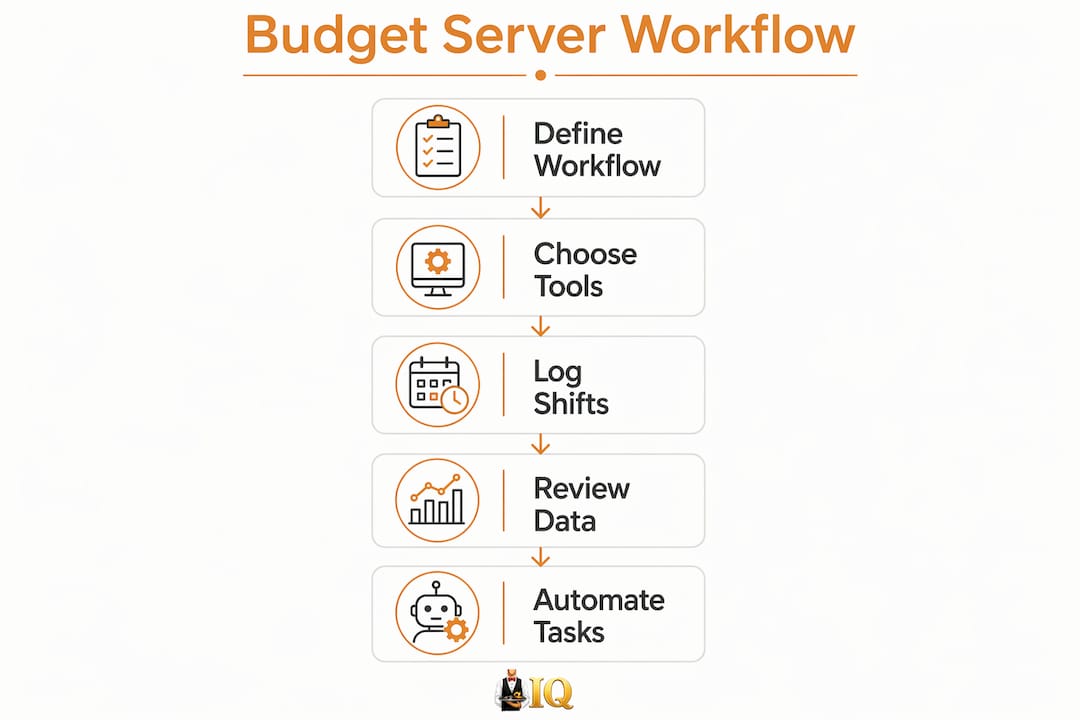
How to build a step-by-step budget server workflow
A practical, budget-friendly server administration process does not require a manager's approval or an IT department. You can set it up yourself in under 30 minutes and run it daily in under two minutes per shift.
- Choose one tracking tool and commit to it. Switching between apps splits your data and creates gaps. Pick Serveriq or a comparable low-cost tracker and use only that.
- Log every shift immediately after it ends. Memory fades fast after a busy Friday night. Record your hours, tip total, and any cash tips before you leave the building.
- Separate cash tips from card tips. These are taxed differently and reported separately. Keeping them distinct from day one saves hours of sorting at tax time.
- Review your weekly totals every Sunday. A five-minute review each week shows you which shifts pay best, which sections earn more, and whether your income is trending up or down.
- Check your paycheck against your logged hours. Restaurant payroll errors are more common than most servers realize. Comparing your records to your stub catches mistakes before they compound.
- Set a monthly income goal and track progress toward it. Knowing your average weekly earnings lets you plan for slow seasons and avoid financial surprises.
Non-technical tools enable tasks like logging, reporting, and monitoring without any coding skills, using visual builders and centralized dashboards. That principle applies directly to server income tracking. The simpler the interface, the more consistently you will use it.
Pro Tip: Use Serveriq's voice assistant Chip to log your shift while walking to your car. You are far more likely to record accurate numbers when the process takes ten seconds.
The biggest workflow pitfall is inconsistency. Servers who log shifts three days out of five end up with incomplete data that cannot support any real financial decision. Build the habit by attaching your logging step to something you already do, like clocking out or turning in your apron.
What best practices keep your server workflow cost-effective?
Maintaining a budget-friendly workflow requires periodic reviews, not just a good setup. The same habits that save money at launch will save more money over time if you keep them sharp.
Monthly audits of resource usage reveal 30–50% potential cost savings by identifying overprovisioned or unused capacity. Applied to a server's workflow, this means reviewing which tools you actually use and cutting anything that duplicates effort.
Do's and don'ts for ongoing workflow efficiency:
- Do review your income reports monthly to spot trends in your best and worst earning shifts.
- Do compare your logged tips against your reported tips to catch discrepancies early.
- Do use a single tool for all tracking. Fragmented records create confusion and gaps.
- Don't pay for features you never use. A $3/month tracker beats a $15/month app you open twice.
- Don't skip logging during slow weeks. Slow weeks are often where payroll errors hide.
- Don't rely on memory for cash tips. Even experienced servers underestimate cash totals by the end of a busy weekend.
Hidden labor costs often make cheaper unmanaged options more expensive overall because of the extra manual maintenance time they require. For servers, the equivalent is using a free but clunky app that takes ten minutes to update. The time cost outweighs the zero price tag.
True affordability means saving both money and time. A workflow that takes 20 minutes per shift to maintain is not affordable, regardless of what the tool costs. The goal is a process that runs in under two minutes daily and gives you clear, accurate data at the end of every month.
Standardizing your server management processes creates consistency that makes your income data reliable enough to use for tax planning, budgeting, and negotiating better shifts.
How do you fix common mistakes in a server management workflow?
Even well-intentioned workflows break down. The most common problems are inaccurate tip recording, skipped shifts, and using too many tools at once. Each has a direct fix.
| Problem | Likely cause | Solution |
|---|---|---|
| Inaccurate tip totals | Logging from memory hours later | Log immediately after each shift ends |
| Missing shift records | No consistent logging habit | Attach logging to a fixed end-of-shift action |
| Cash and card tips mixed up | No separation system | Use separate fields or labels from day one |
| Paycheck errors go unnoticed | No comparison to personal records | Cross-check every stub against your logged hours |
| Tool abandoned after two weeks | Too complex or time-consuming | Switch to a simpler, faster tool like Serveriq |
Implementing structured workflows with regular audits can reduce overall costs by 15–50% in the first month. For servers, that translates to catching payroll errors, identifying your highest-earning shifts, and cutting tools that add no value.
Automation is the most reliable fix for repetitive manual tasks. Serveriq's voice-input feature through Chip removes the friction of manual data entry entirely. You speak your shift details, and the app records them. That single change eliminates the most common reason servers stop tracking: it was too much work.
Tip tracking alternatives exist across a range of price points, but the best choice for most servers is one that requires no technical setup and works from a phone. Complexity is the enemy of consistency.
Key Takeaways
An affordable server management workflow saves money and time only when it is simple enough to use every single shift without fail.
| Point | Details |
|---|---|
| Define your workflow first | Choose one tool, one logging habit, and one review schedule before adding anything else. |
| Log shifts immediately | Recording tips right after a shift ends produces far more accurate data than logging from memory. |
| Separate cash and card tips | Keeping these distinct from day one prevents hours of sorting at tax time. |
| Review monthly, not just weekly | Monthly income reviews reveal earning patterns that weekly checks miss entirely. |
| Cut tools you do not use | Paying for unused features adds cost without adding value to your workflow. |
Why simple workflows beat complex ones every time
Servers and bartenders are not looking for a financial management platform. They want to know what they made, whether their paycheck is right, and which shifts are worth picking up. That is a narrow, specific need, and it deserves a narrow, specific tool.
I have watched hospitality workers spend more time managing their tracking app than actually reviewing their income. They set up elaborate spreadsheets, download three different apps, and then abandon all of it by week three because the process costs more energy than it returns. The irony is that the most expensive workflow mistake is not paying for the wrong tool. It is spending time on a process that does not stick.
The servers who actually build income transparency are the ones who pick the simplest possible system and use it without exception. Serveriq at $3 per month, with voice logging through Chip, is the closest thing I have seen to a workflow that disappears into the background. You do not think about it. You just speak your shift details, and the data is there when you need it.
Transparency also changes how you feel about your work. When you can see that Tuesday lunch shifts consistently pay 40% less than Friday dinner shifts, you make better decisions about your schedule. That knowledge is worth far more than the cost of any tracking tool.
— sadler
Serveriq fits a budget server workflow from day one
Restaurant and bar staff need income tracking that works as fast as a busy shift moves. Serveriq was built for exactly that situation.
At $3 per month, Serveriq lets you track tips and wages across every shift, with detailed income reports that show your earning patterns over time. The virtual assistant Chip logs your shifts by voice, so there is no typing, no spreadsheet, and no delay. You get the income transparency that most servers never have, at a price that fits any budget. Check out Serveriq's subscription options and see how a consistent workflow changes what you know about your own earnings.
FAQ
What is an affordable server management workflow for restaurant staff?
An affordable server management workflow is a set of low-cost, repeatable steps that help servers and bartenders log shifts, track tips, and review income without expensive tools or technical skills. Serveriq delivers this for $3 per month.
How do I track tips accurately on a budget?
Log your tip total immediately after each shift ends, before you leave the restaurant. Separating cash tips from card tips from the start prevents errors at tax time.
What is the best low-cost tool for server income tracking?
Serveriq is the most cost-effective option for individual servers, offering tip tracking, hourly wage logging, and voice-input shift recording for $3 per month.
How often should I review my server workflow?
Review your income data weekly for paycheck accuracy and monthly for earning trends. Monthly reviews reveal which shifts and sections consistently pay the most.
Why do most servers stop tracking their income?
Most servers abandon tracking because the process is too slow or complicated. Choosing simpler tools with voice input or one-tap logging removes the friction that causes most people to quit.