
Tracking your income and tips as a restaurant server or bartender is what "server health monitoring" actually means for you. It's the regular practice of recording shifts, logging tips, reviewing your earnings, and catching errors before they cost you real money. Think of it as a financial check-up you run on yourself, not a tech concept.
Table of Contents
- What does server health monitoring mean for your income?
- Why tracking your tips and income actually matters
- Key elements to include when monitoring your earnings
- Practical tools and methods for tracking your earnings
- How to read your earnings data and actually improve your income
- Key Takeaways
- Serveriq gives servers a real earnings picture for $3 a month
What does server health monitoring mean for your income?
For servers and bartenders, income monitoring means keeping a clear, accurate record of every dollar you earn, including tips, hourly wages, and any special payments. Your income is variable by nature, which makes consistent tracking more important than it is for salaried workers. A missed cash tip here, an unlogged shift there, and your budget and tax records are already off.
Core components of healthy income monitoring:
- Shift records: Date, hours worked, and which station or section you covered
- Tip logs: Cash tips and card tips recorded separately, per shift
- Wage entries: Hourly pay, overtime, and any adjustments
- Discrepancy notes: Any payment errors or missing amounts flagged immediately
Why tracking your tips and income actually matters
Accurate tip tracking protects you in two concrete ways: your budget and your taxes. When your income fluctuates week to week, even small untracked amounts add up to a distorted picture of what you actually earn. Undetected income discrepancies are costlier over time than any effort spent monitoring.
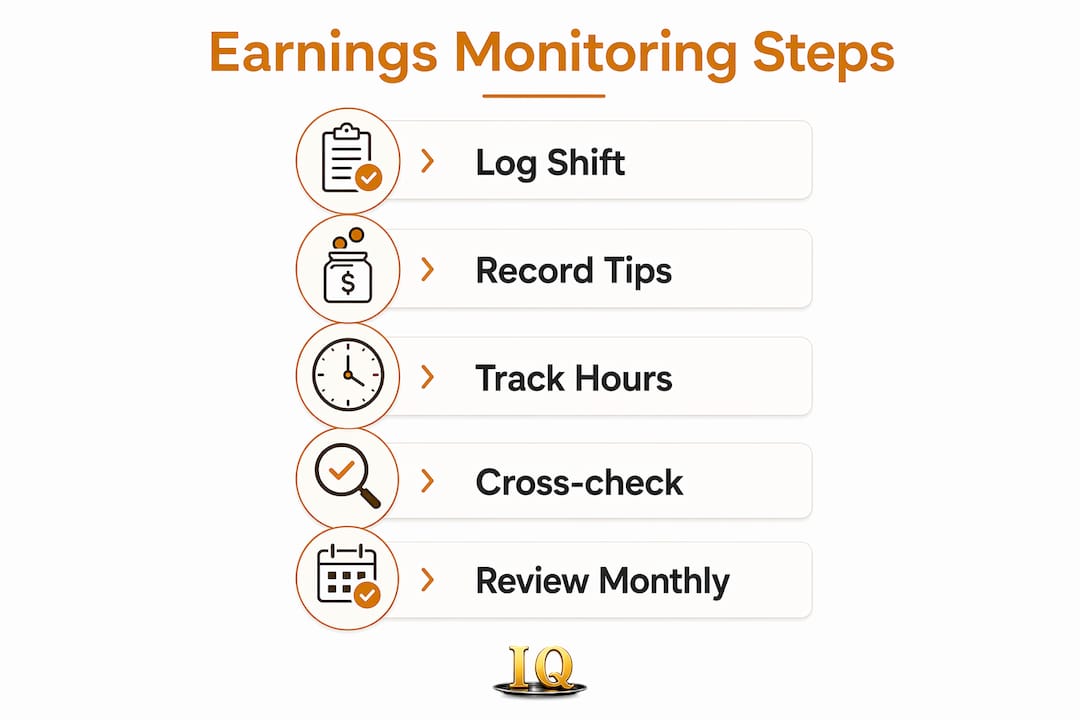
A common tracking error is failing to log cash tips, which leads to underreported income and tax reporting problems. The IRS expects servers to report all tip income, cash included.
Why consistent monitoring pays off:
- Accurate records for tax filing and avoiding penalties
- Reliable data for budgeting rent, bills, and savings
- Early detection of payroll errors or missing tip-outs
- Proof of income for loans, leases, or financial applications
Key elements to include when monitoring your earnings
Every shift you work should generate a record. The goal is a complete picture, not just a rough total at the end of the month. Hybrid tracking approaches that combine your own logs with external verification, like comparing your records to your pay stub, catch errors that internal notes alone miss.
What to record for each shift:
- Date and shift time (lunch, dinner, late night)
- Total hours worked
- Cash tips received
- Card tips from receipts or POS reports
- Tip-out amounts paid to support staff
- Any special payments (event gratuities, holiday bonuses)
- Wage amount for that shift
Keeping this level of detail takes under two minutes per shift. Over a month, it gives you a complete earnings record that holds up to scrutiny.
Pro Tip: Cross-check your logged tips against your POS end-of-shift report at least once a week. Discrepancies are much easier to resolve within a few days than weeks later.
Practical tools and methods for tracking your earnings
Manual logs work, but they break down fast during a busy week. A notebook left at home or a spreadsheet you forget to update creates exactly the gaps you're trying to avoid. Tailored solutions designed for restaurant staff handle fluctuating shifts and tip-dependent income far better than generic finance apps.
Tracking options worth knowing:
- Paper log or notebook: Free, no setup, but easy to lose or forget
- Spreadsheet (Google Sheets): Flexible and free, requires manual entry discipline
- General budgeting apps: Useful for expenses but not built for tip tracking
- Purpose-built earnings apps: Designed for variable income, shift-based logging, and tip breakdowns
AI-assisted income tracking saves time and reduces entry errors for servers with packed schedules. Serveriq's app takes this further with Chip, a virtual assistant that lets you log shifts and update earnings through voice commands. You finish a shift, say a few words, and the record is done.
Pro Tip: Log your tips before you leave the building. Memory fades fast after a long shift, and cash amounts are the first detail to blur.

How to read your earnings data and actually improve your income
Logging data is only half the job. Regular review of tracked earnings reveals patterns that help you earn more, not just record what you already made.
Look for these patterns in your records:
- Which shifts consistently produce the highest tips? Request more of them.
- Which sections or stations correlate with better tip percentages? Talk to your manager about rotation.
- Are there weeks where income drops sharply? Identify whether it's seasonal, scheduling, or something you can control.
- Do your card tips match what the POS system shows? Consistent gaps signal a payroll issue worth raising.
Proactive strategies identify income discrepancies before they compound. Reviewing your data monthly, not just at tax time, turns your records from a filing requirement into a tool for earning more.
Key Takeaways
Consistent income monitoring is the single most effective habit a server or bartender can build for financial stability and smarter earnings decisions.
| Point | Details |
|---|---|
| Log every shift completely | Record tips, hours, wages, and tip-outs for each shift to maintain accurate financial records. |
| Cross-check against pay stubs | Comparing your logs to POS reports and pay stubs catches errors internal notes alone miss. |
| Review patterns monthly | Identifying your highest-earning shifts and sections helps you request better scheduling. |
| Log cash tips immediately | Failing to log cash tips leads to underreported income and tax filing problems. |
| Serveriq offers affordable subscription plans for income tracking tailored to servers. | Serveriq tracks tips, wages, and shifts with voice-command logging through its Chip assistant. |
Serveriq gives servers a real earnings picture for $3 a month
Most finance apps were built for salaried workers. Serveriq was built for you. At $3 per month, it tracks tips, hourly wages, and variable pay in one place, with detailed earnings reports that show trends across shifts, days, and weeks.
The Chip virtual assistant sets Serveriq apart from any spreadsheet or generic app. Log a shift by voice the moment you clock out, and the record is done before you reach your car. No manual entry, no forgotten cash amounts, no gaps at tax time. Earnings reports tailored for restaurant workers give you clear visualizations of where your income comes from and where it can grow. If you want a budget-friendly monitoring approach that actually fits a server's schedule, Serveriq is the practical answer. Sign up at myserveriq.com and start your first shift log today.