
Monitoring is the difference between a restaurant floor that runs smoothly and one that falls apart by 7 PM on a Saturday. At its core, the role of monitoring in resource planning is to track actual server staffing against your planned allocations in real time, so you catch problems while they're still fixable. Without it, you're managing by memory and gut feel, which works until it doesn't.
Effective monitoring covers four core elements:
- Resource availability: Are scheduled servers actually showing up and ready to work their assigned sections?
- Utilization: Are servers carrying balanced table loads, or is one section drowning while another sits idle?
- Efficiency: How do actual hours worked compare to planned shift hours, and where is labor cost drifting?
- Deviation alerts: Which shifts are running over capacity, and which metrics are signaling a bottleneck before it becomes a crisis?
These aren't abstract project management concepts. For a restaurant manager overseeing a team of servers, they translate directly to table turn times, guest satisfaction scores, and labor cost as a percentage of revenue.
Why continuous monitoring matters throughout the server staffing lifecycle
A resource plan written on Monday morning is already outdated by Tuesday's lunch rush. Set-and-forget planning fails because weekly shifts in scope and staff availability require ongoing adjustments to prevent bottlenecks. A server calls out sick. A private dining event gets added to the calendar. A new hire needs extra support during their first floor shift. None of these appear in the original plan.

PMBOK 8 identifies "Monitor and Control Resourcing" as a continuous process performed throughout the project lifecycle, not a one-time checkpoint. The key benefit is ensuring assigned resources are available at the right time and place, and that deviations from the plan are caught before they compound. For restaurant managers, that means checking staffing alignment before service, during peak hours, and after close.
Benefits of continuous monitoring during service execution:
- Catches understaffing before the dinner rush hits, not after complaints roll in
- Identifies servers who are consistently over-assigned, reducing burnout and turnover risk
- Flags labor cost overruns while there's still time to adjust the schedule
- Supports accurate forecasting for future high-volume nights based on real utilization data
- Keeps staffing decisions grounded in actual performance rather than assumptions
Pro Tip: Build a brief end-of-shift check-in into your team's routine. When servers flag their own workload issues directly, you get ground-level data that no scheduling software captures on its own. Team-wide monitoring involvement strengthens accountability across every level of the floor.
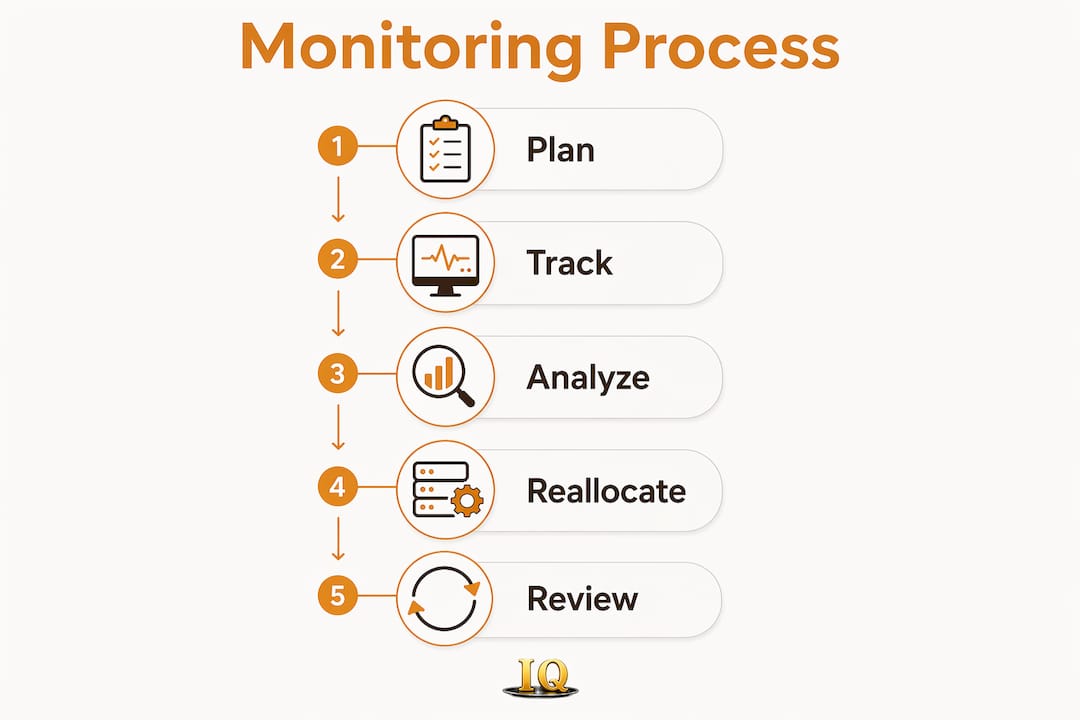
Key metrics and methods for tracking server resource utilization
Knowing you need to monitor is one thing. Knowing exactly what to measure is where most managers get stuck. The metrics below give you a concrete framework for assessing server staffing efficiency.

| Metric | Definition | Benchmark for Hospitality |
|---|---|---|
| Utilization rate | Actual hours worked vs. scheduled hours | Target range for utilization |
| Capacity vs. demand | Covers per server vs. section capacity | No server exceeding section max |
| Cost variance | Actual labor cost vs. budgeted labor cost | Close alignment with budgeted labor cost |
| Planned vs. actual hours | Scheduled hours vs. hours clocked | Minimal variance between planned and actual hours |
| Forecast accuracy | Predicted covers vs. actual covers served | Forecast closely matches actual service volumes |
Performance reviews that include variance analyses and trend detection are the standard method for monitoring resource utilization. For server staffing, that means comparing scheduled hours against actual clock-in data weekly, not just at month-end payroll.
Real-time data tracking is the most effective monitoring method available to restaurant managers today. Scheduling platforms that sync with point-of-sale systems give you live visibility into table assignments, server workloads, and labor cost as service unfolds. Variance analysis then layers on top of that live data, showing you where the plan and reality diverged and why. Early detection of a 15% utilization overrun at week three allows a simple schedule adjustment. The same overrun found at month four requires expensive corrective action or scope reduction.
How monitoring data drives smarter server reallocation decisions
Monitoring without action is just data collection. The real value comes when utilization reports and variance trends actually change how you assign servers, build schedules, and respond to unexpected demand.
When monitoring reveals that two servers are consistently hitting 110% of their section capacity while others run at 70%, the data gives you the justification to reallocate. You're not asking a server to take on more tables based on a feeling. You're showing the numbers to your floor manager and making a case grounded in actual vs. planned utilization.
Monitoring-driven decisions restaurant managers make regularly:
- Substituting a high-performing server into a larger section when demand spikes
- Shifting a server's start time to better align with the actual peak cover window
- Adjusting section boundaries mid-service when one area is overloaded
- Releasing a server early on a slow night to reduce labor cost without compromising coverage
- Requesting an additional server for a future shift based on trend data from comparable nights
Real-time monitoring helps track whether resources are being used efficiently, whether workloads are balanced, and whether changes are required. That's the practical definition of informed decision-making for a restaurant floor.
Pro Tip: Share your weekly utilization reports with your server team, not just your management staff. When servers see their own workload data, they take ownership of flagging imbalances early. Transparent monitoring practices build the kind of accountability that prevents small staffing gaps from becoming service failures.
What research and industry standards say about monitoring best practices
PMBOK 8's guidance on resource monitoring is clear: every deviation from the resource plan is an early warning signal requiring analysis and a response decision. The framework applies directly to restaurant staffing. A server who consistently clocks out 45 minutes early isn't just a scheduling quirk. It's a signal that section assignments, cover forecasts, or shift lengths need adjustment.
Purpose-driven monitoring prevents data overload. Tracking every possible metric produces noise. Tracking utilization rate, cost variance, and forecast accuracy produces decisions. The distinction matters because managers who chase too many numbers often end up acting on none of them.
High-performing teams engage members beyond the manager level to track resource utilization and flag issues. In a restaurant context, that means servers, shift leads, and floor managers all participate in the monitoring process, not just the scheduling manager reviewing a report alone on Tuesday morning.
Evidence-based best practices for server resource monitoring:
- Define two or three core metrics before the shift, not after
- Review variance data at the same time each week to build a reliable feedback loop
- Involve servers in flagging workload imbalances rather than waiting for complaints
- Use historical utilization patterns to refine future scheduling estimates
- Treat monitoring data as a living record, not a one-time snapshot
How project management software integrates monitoring data for restaurant teams
Scheduling platforms that connect directly to POS systems give managers a single view of labor cost, server utilization, and cover counts without manual data entry. When a server's actual hours deviate from the schedule, the system flags it automatically. When cover counts exceed the forecast, the platform surfaces the gap before the floor manager notices it in person.
Shared project dashboards provide both tactical teams and executive stakeholders real-time views into resource availability, project progress, and team capacity. For a multi-location restaurant group, that means a regional manager can see utilization trends across every property without waiting for individual shift reports. Tools like Homebase, 7shifts, and Deputy integrate scheduling, time tracking, and labor cost monitoring into one platform built specifically for hospitality teams.
The most useful integrations pull real-time data on resource utilization, schedule progress, and budget consumption into a single dashboard. That visibility is what separates reactive staffing decisions from proactive ones.
Real examples of monitoring improving server resource planning outcomes
A casual dining group managing eight locations reduced overtime costs after implementing weekly utilization reviews. By comparing planned versus actual server hours each Monday, their scheduling team identified a pattern: Friday dinner shifts consistently ran 12%–15% over planned hours because the cover forecast underestimated late arrivals. Adjusting the forecast and adding a staggered server start time eliminated most of the overtime within a month.
A single-location fine dining restaurant used shift-level variance data to discover that their most experienced servers were being assigned to the lowest-volume sections, while newer staff handled the highest-cover tables. Monitoring revealed the mismatch. Reassigning sections based on utilization data improved both table turn times and guest satisfaction scores over the following quarter.
These outcomes reflect what continuous resource monitoring produces when applied consistently: fewer surprises, faster corrections, and staffing decisions backed by real numbers rather than guesswork.
Key Takeaways
Continuous monitoring transforms server resource planning from a static schedule into a living management system that responds to real conditions on the floor.
| Point | Details |
|---|---|
| Monitor continuously, not periodically | Weekly or shift-level reviews catch deviations while corrections are still low-cost. |
| Track three core metrics | Utilization rate, cost variance, and forecast accuracy give the clearest picture of staffing health. |
| Early detection saves money | A 15% utilization overrun caught at week three requires a schedule tweak, not overtime or scope cuts. |
| Involve the whole team | Servers and shift leads who participate in monitoring flag issues faster than managers reviewing reports alone. |
| Use historical data to improve forecasts | Utilization patterns from past shifts refine future scheduling estimates and reduce repeat mistakes. |